Finally more transparency when choosing flight fares: New fare comparison view now available
The feature many travelers have been waiting for: Compare flight fares at a glance and easily choose the option that fits your trip best.
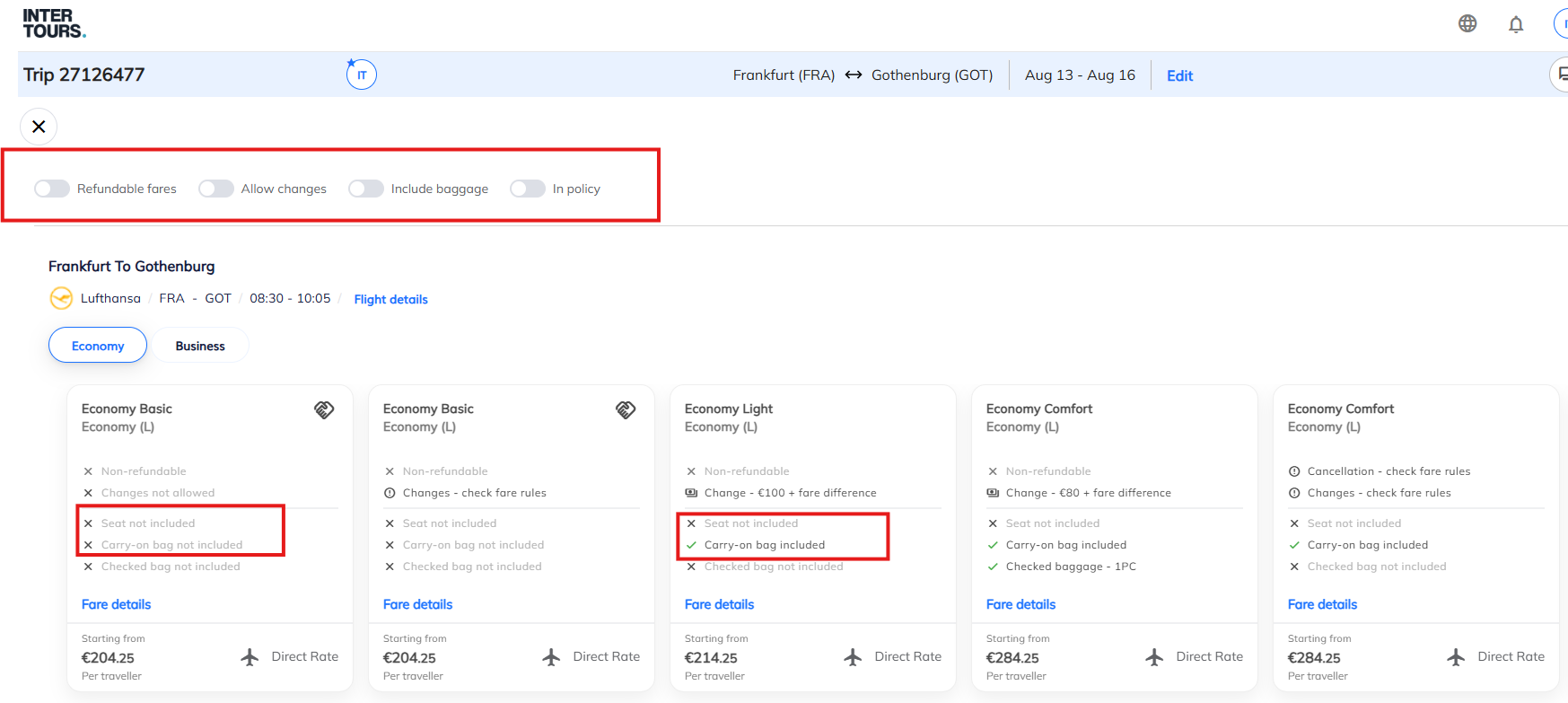
The new Flights Pricing Options screen is now available in the online booking tool, bringing a significantly improved way to review and compare available flight fares.
Instead of comparing individual fare options separately, travelers and arrangers can now see available fares side by side, including the most important services and conditions included with each option.
What’s new?
The new view allows users to compare available fare options for each flight directly. For every fare, the most relevant services are displayed clearly:
- Cancellation conditions
- Change options
- Seat assignment
- Carry-on baggage
- Checked baggage
This makes it easy to understand what is included in each fare and select the option that best matches the traveler’s needs.
What does this mean for you?
The new fare comparison view provides:
- Greater transparency: All available fare options can be compared directly in one place.
- Simpler selection: Easy-to-use filters help you quickly find the right option, including:
- refundable fares
- fares allowing changes
- fares including baggage
- in-policy fares
- More flexibility: Where airlines support mixed fare combinations, travelers can select the best available fare combination across outbound and return flights.
Your benefit
The new design makes flight booking easier, faster, and more transparent. Travelers get a clear overview of available options and can make better-informed decisions when selecting the right fare for their journey.
Please note: The new view is currently available for Complete Trip searches only. Support for Schedule Search will follow in a future update.
Was this article helpful?
That’s Great!
Thank you for your feedback
Sorry! We couldn't be helpful
Thank you for your feedback
Feedback sent
We appreciate your effort and will try to fix the article