How to Quickly Find Your Cancellation and Change Policies
You may not be aware of this feature: You can easily view the cancellation and change policies for your booking at any time in the Price Breakdown section of your Trip Overview.
Here's how:
- Open your Trip Overview.
- Click Price Brekadown.
- You'll find a clear summary of the cancellation and change policies that apply to your booking.
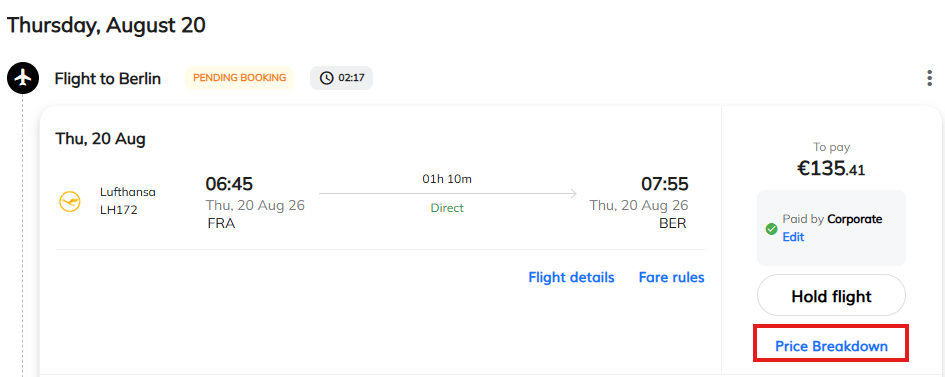
This allows you to quickly check the rules and conditions for your booking.
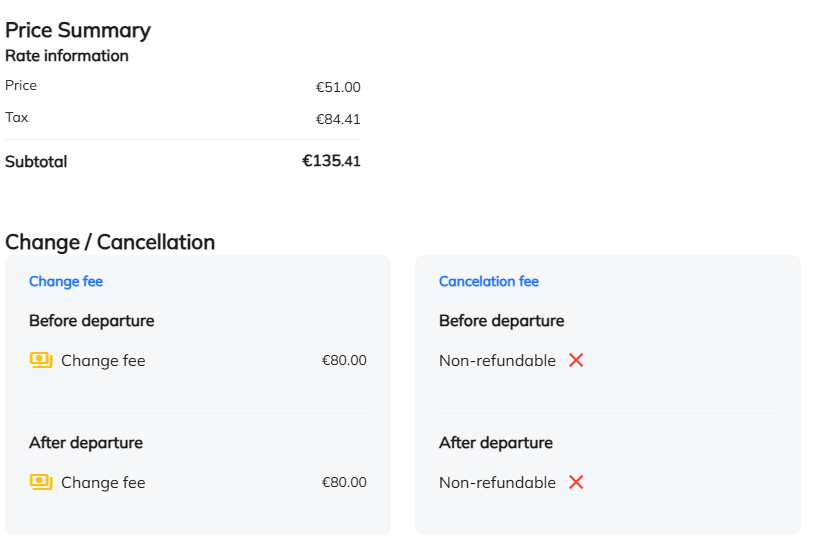
Note:
In some cases, an airline's fare rules may be particularly detailed or technically complex. When this happens, the conditions cannot always be displayed accurately in a clear summary. Rather than showing incomplete or potentially misleading information, no conditions will be displayed.
If you cannot find the information in Price Brekadown, please contact your travel agency or customer service, who will be happy to provide the applicable conditions for your booking.
Was this article helpful?
That’s Great!
Thank you for your feedback
Sorry! We couldn't be helpful
Thank you for your feedback
Feedback sent
We appreciate your effort and will try to fix the article